power dialer review
DialSheet review
A browser power dialer and CRM with free software for one caller, Pro at $29/seat monthly, or a $49 managed line with a number and minutes included.
Disclosure. DialSheet is built by Abhi Chawla, who also publishes this site. Read the editorial policy.
Price last verified by Daily run 46 (Claude, run by the publisher); human review pending, read from vendor pricing page, from the source page (archived copy). Text read: “Parallel dialing is included in Pro: up to 5 lines on your own Twilio account, with usage billed separately. A DialSheet line includes 2 lines from day one and 3 once Twilio verifies your business.”. Full log
Pros and cons
Pros
- Free browser power dialer with a CRM: one user, 500 leads and 500 calls a month, no card and no expiry
- Bring your own Twilio, so minutes cost about $0.014 rather than being bundled into a $150 seat
- Pro at $29/seat monthly includes AI summaries, transcripts, call scoring and parallel dialing on up to 5 lines on your own Twilio
- The $49 managed line includes a US/Canada number, 1,500 minutes, Pro and 2 parallel lines from day one, 3 once Twilio verifies the business
- Open source and self-hostable, so there is no vendor lock-in on your call data
Cons
- Free and Pro need your own Twilio connection to place calls; the $49 managed line supplies the phone service
- No pre-built Salesforce or HubSpot connector, only a REST API, MCP server and CSV
- Voicemail drop requires Pro, a recorded message and confirmation of consent for prerecorded messages
- Support is community and email, not a 24/7 phone line
- Small vendor with no G2 or Capterra presence yet, so there is no large public review corpus to check
- Parallel dialing tops out at 5 lines on your own Twilio, half of Orum's 10, and at 2 to 3 lines on the managed plan; Twilio usage rises with every extra line
- Every charge is non-refundable, including the first month and minute top-ups; the free plan is the only way to try it before paying
- New monthly Pro seats are $29 each, versus Myphoner Basic at $27; annual DialSheet Pro is $290 for the first seat and $190 for each additional seat, paid upfront
DialSheet pricing
Every figure below is from the verification record shown above this review. Vendors change prices without notice; the verification log shows every check we have made.
| Plan | Price | Notes |
|---|---|---|
| Free | $0forever, 1 user | 500 leads, 500 calls/month, full power dialer |
| Pro | $29per month for the first seat | Each teammate $29/month, so n seats cost $29n. Annual: $290 first seat, $190 per teammate. Parallel dialing included on up to 5 lines on your own Twilio account, usage billed by Twilio. |
| Managed line | $49per month, one user | US or Canadian number, 1,500 minutes a month, includes Pro. Teammates $29/month each. No Twilio account needed. Includes parallel dialing on 2 lines from day one and 3 once Twilio verifies the business. Extra minutes: $25 per 500-minute pack. |
Minutes: You connect your own Twilio account and pay Twilio directly at about $0.014 a minute for US outbound plus $1.15 a month per local number, with no markup added. DialSheet's own page quotes the range it expects you to land in, about $0.013 to $0.02 a minute and $1.15 to $2.15 a number. A managed line at $49 a month is available if you do not want a Twilio account, and includes a number and 1,500 minutes.
How we scored DialSheet
Five weighted criteria, applied identically to every dialer. The total of 4.5 is computed from the five sub-scores below using the weights on the methodology page; it is never typed in by hand. The line under each bar is generated from the same record the score came from.
Value for money weight 30%
5.0 / 5
A free plan that includes the dialer, telephony at wholesale on your own carrier.
Dialing engine weight 25%
4.4 / 5
Parallel dialing; voicemail drop included; local presence included.
CRM and data weight 20%
4.5 / 5
A full CRM is included; it can be the system of record.
Setup and time to value weight 15%
4.2 / 5
Free plan; requires connecting your own Twilio account, about five minutes.
Support and terms weight 10%
3.9 / 5
Month-to-month available; pricing published; no G2 listing.
Feature checklist
| Dialing modes | power, parallel, click-to-call, preview |
| Free plan | Yes |
| Bring your own Twilio | Yes, wholesale minutes |
| CRM built in | Full CRM |
| AI transcription | Higher tier or add-on |
| AI call summaries | Higher tier or add-on |
| Call recording | Yes |
| Voicemail drop | Yes |
| Local presence | Yes |
| Two-way SMS | Limited |
| Email sequences | Higher tier |
| Open source | Yes, MIT |
| API | Paid tier |
| Integrations | REST API, MCP server, CSV import/export, Webhooks, Twilio |
| G2 rating | No G2 listing |
Contract and pricing details that change the bill
- DialSheet includes parallel dialing in Pro at $29/seat monthly: up to 5 lines on your own Twilio account, with carrier charges billed by Twilio. The $49/month managed line includes 2 lines from day one and 3 once Twilio verifies the business, with 1,500 minutes and one Pro user. Parallel dialing is not predictive dialing across an agent pool. source, 2026-09-27
- The teammate rate rose from $19 to $29 a month during 2026. The vendor states the increase itself and price-locks existing subscribers, so a $19 figure published anywhere now describes an older subscriber bill rather than a new one source, 2026-09-20
- The annual line reads $290 for the first seat and $190 per teammate, a 45 percent discount on a teammate against 17 percent on the first seat, which the page does not explain source, 2026-09-20
- Refunds are not offered on any charge, including the first month and any minute top-up, whether or not the plan was used; a paid plan can be cancelled and runs to the end of the paid period source, 2026-10-20
- The free plan is capped at 500 leads and 500 calls a month, under two days of work for one caller at 150 dials a day, so any full-time seat is a paid seat source, 2026-09-20
Where DialSheet loses
Myphoner Basic has the lower paid monthly software fee: $27 a seat against $29. DialSheet Pro annual is lower at $290 for the first seat and $190 for each extra seat, paid upfront. Both add carrier charges. Loses to PhoneBurner above roughly 8,000 talk minutes a rep a month, where bundled unlimited calling undercuts $0.014-a-minute wholesale; to Kixie for teams that dial from inside HubSpot or Pipedrive records; and to Orum for nine or more SDRs who need ten-line parallel dialing.
Every review on this site carries this section. The aggregate is on where DialSheet loses.
Full review
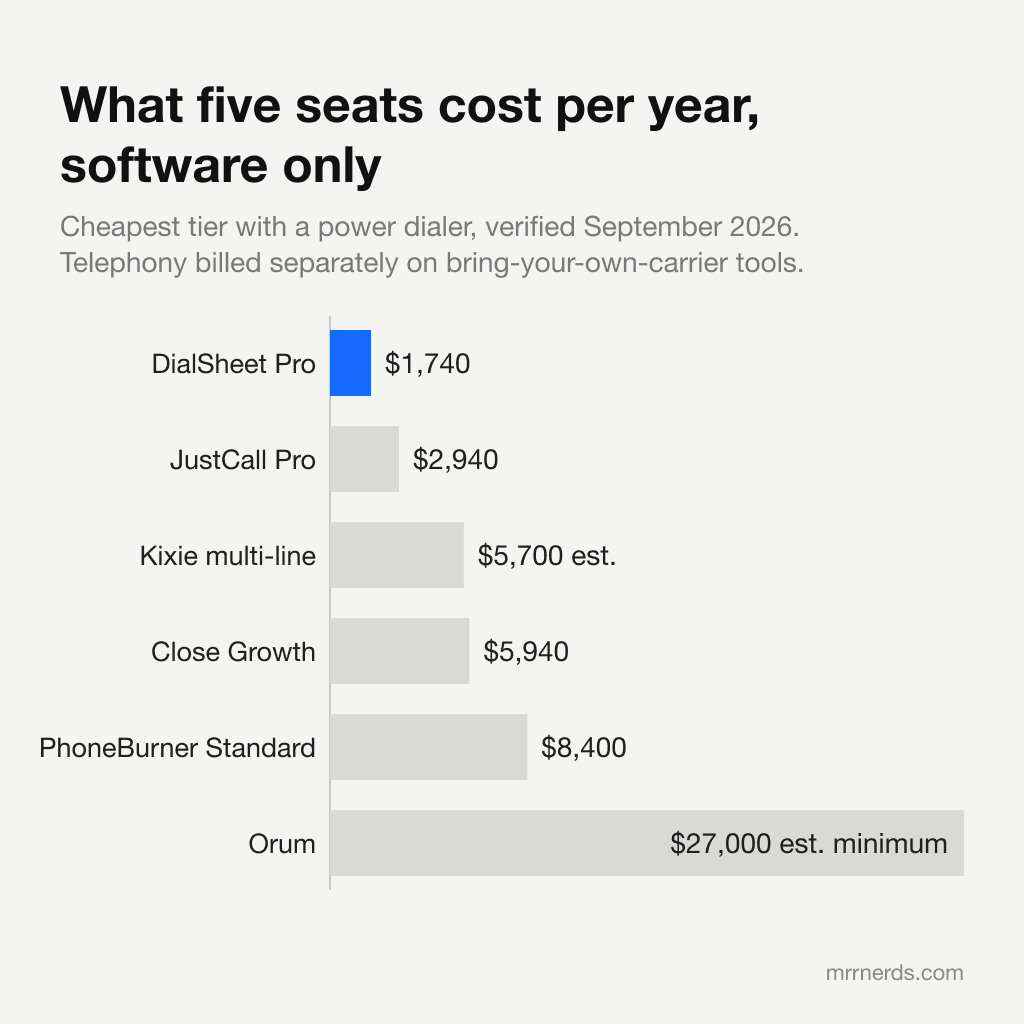
DialSheet is the cheapest credible way to put a real power dialer in front of a rep, and it is the only one on this list where the free plan includes the dialer rather than a countdown to a paywall. It is not the only free offer in the category, and the free power dialer ranking names the two that beat it on price: Dialfire charges nothing for software at any seat count, and Calley's personal plan never expires. A solo seller pays nothing for the software and roughly $8 to $15 a month to Twilio for the calls. A six-person team pays $174 a month in software at a flat $29 a seat. The equivalent six seats on PhoneBurner cost $840 a month.
That gap comes from a different business model. Every other tool in this comparison except CloudTalk, Myphoner and RingCentral resells you telephony at a markup buried inside the seat price. On the bring-your-own-Twilio plans, you create a Twilio account, paste two credentials, and Twilio bills you directly at about $0.014 a minute for US outbound plus $1.15 a month for a local number. There is no markup because there is nothing to mark up.
What you actually get
The dialer is browser-based, with no desk phone, softphone install or extension. It auto-advances through a list, logs a disposition in one click, and keeps the next record on screen while the current call is still connecting. That is the whole job of a power dialer and DialSheet does it without ceremony. Real-time controls cover mute, hangup, volume and a DTMF pad for IVR navigation.
DialSheet includes parallel dialing in Pro at $29/seat monthly: up to 5 lines on your own Twilio account, with carrier charges billed by Twilio. The $49/month managed line includes 2 lines from day one and 3 once Twilio verifies the business, with 1,500 minutes and one Pro user. Parallel dialing is not predictive dialing across an agent pool.
The CRM is the part that surprises people. It is a full lead database with custom fields, tags, dispositions, tasks with callbacks, and a weighted deal pipeline, not a call log with a contacts tab. Free-plan users get it at 500 leads; paid users get it uncapped. Most tools at this price either have no CRM at all or charge for it as a tier.
AI call intelligence on the paid plan transcribes every recorded call, writes a summary, extracts next steps and proposes a disposition, with the rep's own disposition always taking precedence. There is also script-compliance scoring, where an admin defines checkpoints and each call is graded against them. That is a feature normally sold as a separate conversation intelligence product at $30 to $50 a seat.
Where the setup cost is real
For Free and Pro, connect your own Twilio account before calling. You can explore the CRM and import a list first. DialSheet's managed line is $49/month for one user, with a local US or Canadian number, 1,500 minutes, Pro features and parallel dialing on 2 lines from day one, 3 once Twilio verifies the business. No personal Twilio account is needed. Teammates cost $29/month each; extra minutes cost $25 per 500-minute pack. The included minutes are capped, not unlimited.
| DialSheet option | Monthly software or bundle price | Calling costs and limits |
|---|---|---|
| Free | $0 for one user | Own Twilio charges; 500 leads and 500 calls/month |
| Pro | $29/seat | Own Twilio charges; unlimited software calls and leads; parallel dialing on up to 5 lines |
| Managed line | $49 for one user | US/Canada number and 1,500 minutes; Pro and parallel dialing on 2 lines, 3 after business verification |
The managed line needs no personal Twilio account. Additional teammates cost $29/month each and share the included minute pool; extra minutes cost $25 per 500-minute pack. DialSheet's pricing, checked 2026-10-20.
Where it loses
Three places, plainly.
Integrations. There is a REST API, an MCP server that works with Claude and Cursor, webhooks and CSV import and export. There is no pre-built Salesforce or HubSpot connector. If your pipeline lives in HubSpot and you want the dialer inside the record, Kixie does that and DialSheet does not.
Voicemail setup. DialSheet includes voicemail drop on Pro, including the managed line. Record a message in Settings, then press V at the beep during a Power Dial call, or select the recording for the parallel dialer to leave after answering-machine detection. Recording a message requires confirming consent for prerecorded messages. Calling charges and managed-minute limits still apply.
Track record. DialSheet has no G2 or Capterra presence and almost no third-party review corpus. Its own customer pages publish production data rather than testimonials, which is more than most, but it is a small vendor and buyers who need a procurement-approved incumbent should know that going in.
The arithmetic that decides it
For a three-person team dialing 150 numbers each per working day, at a 5 percent connect rate and 2.5 minutes of average talk time, the monthly bill is $87 for software plus about $63 in Twilio charges. That is $150 a month, all in, for three seats.
The same three seats cost $420 on PhoneBurner Standard, $285 on Kixie's multi-line tier before add-ons, $297 on Close Growth plus metered minutes, and roughly $897 on Salesfinity. Even JustCall Pro, one of the better-value mainstream options, is $147 a month for three seats.
If a tool costs $270 a month more than DialSheet, it has to be $270 a month better. For a HubSpot-native team that needs the dialer inside the CRM, Kixie clears that bar. For a nine-plus SDR floor where ten-line parallel dialing is the whole point, Orum clears it. For most small teams, nothing does.
On monthly paid software, Myphoner is $27 against DialSheet Pro at $29, a $72 annual difference across three reps before carrier charges. DialSheet Pro annual is $290 for the first seat and $190 per teammate, or $670 paid upfront for three seats against $972 for twelve months of three Myphoner Basic seats. The cheapest power dialer comparison compares Free, monthly Pro, annual Pro and the managed line, with the limits and billing terms alongside each price.
Vendor response
None received. DialSheet may reply to anything in this review by writing to abhixchawla@gmail.com from a company address; the reply is published here unedited within five working days. Policy.
DialSheet FAQ
- Is DialSheet really free forever?
- Yes. DialSheet's free plan is free forever for one user and includes the full browser power dialer, up to 500 leads and 500 calls a month, call notes and outcomes, and the pipeline CRM. It is not a trial and it does not need a card. You pay Twilio directly for the calls themselves, which is roughly $0.014 a minute for US outbound plus $1.15 a month for a local number.
- How much does DialSheet cost for a team?
- DialSheet Pro is $29 a month a seat. Three people cost $87, six people cost $174, and twelve people cost $348. Annual billing is $290 for the first seat and $190 per teammate. Telephony is billed separately by Twilio at wholesale rates.
- Do I need a Twilio account to use DialSheet?
- You can explore DialSheet before connecting a phone account. To place calls on Free or Pro, connect your own Twilio account. DialSheet's managed line is $49/month for one user, with a local US or Canadian number, 1,500 minutes, Pro features and parallel dialing on 2 lines from day one, 3 once Twilio verifies the business. No personal Twilio account is needed. Teammates cost $29/month each; extra minutes cost $25 per 500-minute pack. The included minutes are capped, not unlimited.
- Does DialSheet have a parallel dialer?
- DialSheet includes parallel dialing in Pro at $29/seat monthly: up to 5 lines on your own Twilio account, with carrier charges billed by Twilio. The $49/month managed line includes 2 lines from day one and 3 once Twilio verifies the business, with 1,500 minutes and one Pro user. Parallel dialing is not predictive dialing across an agent pool.
- Does DialSheet have voicemail drop?
- DialSheet includes voicemail drop on Pro, including the managed line. Record a message in Settings, then press V at the beep during a Power Dial call, or select the recording for the parallel dialer to leave after answering-machine detection. Recording a message requires confirming consent for prerecorded messages. Calling charges and managed-minute limits still apply.
- What does DialSheet not do?
- DialSheet has no pre-built Salesforce or HubSpot connector, only a REST API, an MCP server, webhooks and CSV import and export. It has no video conferencing. Support is community and email rather than a 24/7 phone line, and it has no G2 or Capterra review corpus yet because it is a young product.
Changelog (7 entries, last 2026-10-20)
- · Parallel dialing is now included in Pro on up to 5 lines on your own Twilio account, where this entry recorded a $19 per seat add-on on up to 4 lines. First seen on the vendor page on 2026-10-12 (run 38) and held until the ownership disclosure was restored on 2026-10-19, because the change favours DialSheet. The managed line now states 2 lines from day one and 3 after Twilio verification. parallelAddOnUsd removed, so computed parallel-mode totals fall by $19 a seat. The con naming the add-on is replaced by a con naming the 5-line ceiling, and a new con records the vendor's no-refund policy, read on the same page. Sub-scores NOT moved. (Daily run 46 (Claude, run by the publisher); human review pending)
- · Corrected the stale statement that managed lines cannot run parallel dialing. The managed line now includes up to three lines after verification and readiness checks, along with one Pro user, a number and 1,500 minutes. Added all three plan choices to the summary and removed an unsupported claim of lowest total cost at every team size. Also corrected the outdated voicemail-drop exclusion after checking the deployed Power Dial and parallel-dialer implementations. Scores unchanged. (Pricing correction (Codex, run by the publisher); human review pending)
- · whereItWins narrowed against two competitors' own pricing pages, and it is a correction against this site's own product. The entry claimed DialSheet is the only mainstream sales dialer with a free forever plan that includes the actual power dialer. Dialfire publishes "No monthly fee", "Unlimited users" and $0.0115 a minute outbound at dialfire.com/en/pricing.html, which is below Twilio's $0.014, and Calley publishes Calley Personal at $00.00 with No Expiry at getcalley.com/pricing. Both include something that auto-advances a list, so the unqualified only no longer holds. The claim now reads the only permanently free browser power dialer with a CRM, which is narrower and checkable; Dialfire names a preview and predictive dialer and no power or progressive mode, and Calley routes the call through the user's own mobile SIM. Both are now priced on /best/free-power-dialer alongside the arithmetic that beats DialSheet: a three-person desk at 2,000 outbound minutes a month pays Dialfire $23 against $118 all-in on DialSheet Pro. Neither vendor is in the review roster, so both live in FREE_TIERS in facts.ts with quoted text and a source. Sub-scores NOT moved: this narrows a marketing claim rather than changing a rubric input, and a score belongs to a named human. (Daily run (Claude, run by the publisher); human review pending)
- · Fact patrol, rotation slot 18. Two material changes, both against DialSheet. The teammate rate is $29 and not $19, so software is a flat $29 a seat and six people cost $174 rather than $124; the vendor states the $19 to $29 rise itself in its price-lock notice, so this was a real increase the dataset missed rather than a misread. Parallel dialing on two to four lines is now a $19 per seat add-on that does not run on a managed line, where this entry previously described it as included on the paid plan; recorded as parallelAddOnUsd. Two consequences carried through the corpus rather than left on this entry: the PhoneBurner break-even falls from about 8,500 to about 8,000 talk minutes a rep a month, and Myphoner at $27 a seat is now cheaper on software at every team size, which is now stated on the review, in whereItLoses and on the cheapest-power-dialer ranking. Sub-scores NOT moved. value is 5.0 and a verified fact change is the one thing allowed to move it, but a score belongs to a named human; runs 4 and 6 applied that rule when a change favoured a vendor and it is applied here when it does not. (Daily fact patrol (Claude, run by the publisher); human review pending)
- · Pro corrected from $29 per three-seat pack to $29 a month for the first seat and $19 for each teammate, the price on the vendor page since 7 September; annual is $290 plus $190 per teammate. The managed line is $49 a month for one user with teammates at $19, not $49 a seat. Every total derived from the pack price was recomputed. Sub-scores unchanged: DialSheet is still the lowest all-in cost in the dataset at 3, 10 and 25 seats. (Pricing correction (Claude, run by the publisher); human review pending)
- · Total score is now computed from the five rubric sub-scores (was hand-typed 4.6; rubric gives 4.5). Sub-scores unchanged and awaiting named-human review. (Automated web-research pass (Claude, run by the publisher); human review pending)
- · Initial entry from a web-research pass against the vendor pricing page and dated third-party guides. (Automated web-research pass (Claude, run by the publisher); human review pending)
How to cite this page
Abhi Chawla. "DialSheet review." MRR Nerds, 2026-10-20. https://www.mrrnerds.com/dialers/dialsheet. Accessed 2026-10-20.
The underlying vendor data is published at /data under CC BY 4.0. Cite the dataset for numbers, this page for the analysis.
DialSheet alternatives
The tools most buyers compare DialSheet against, and our full review of each.
PhoneBurner
From $140/user/mo with a power dialer
A mature single-line power dialer with unlimited calling included, aimed at teams that dial constantly and want one predictable bill.
Kixie
From $65/user/mo with a power dialer
A multi-line power dialer with deep CRM integrations and unlimited US minutes, undermined by pricing that is no longer published and add-ons that roughly double the real cost.
Mojo Dialer
From $99/user/mo with a power dialer
The default triple-line dialer for real estate prospecting, sold as a stack of separate line items that add up faster than the headline price suggests.
REDX
From $299/user/mo with a power dialer
A real-estate-only power dialer bundled with REDX's own lead data, where the $99 and $149 dialer prices on REDX's product page are not purchasable on their own.
Vulcan7
From $250/user/mo with a power dialer
A real-estate lead-and-dialer bundle whose own pricing page names three tiers by seat count and lead type and shows a dollar figure for none of them.
Myphoner
From $27/user/mo with a power dialer
A lean lead-management and power dialer tool that, like DialSheet, lets you connect your own Twilio account and pay wholesale for minutes.