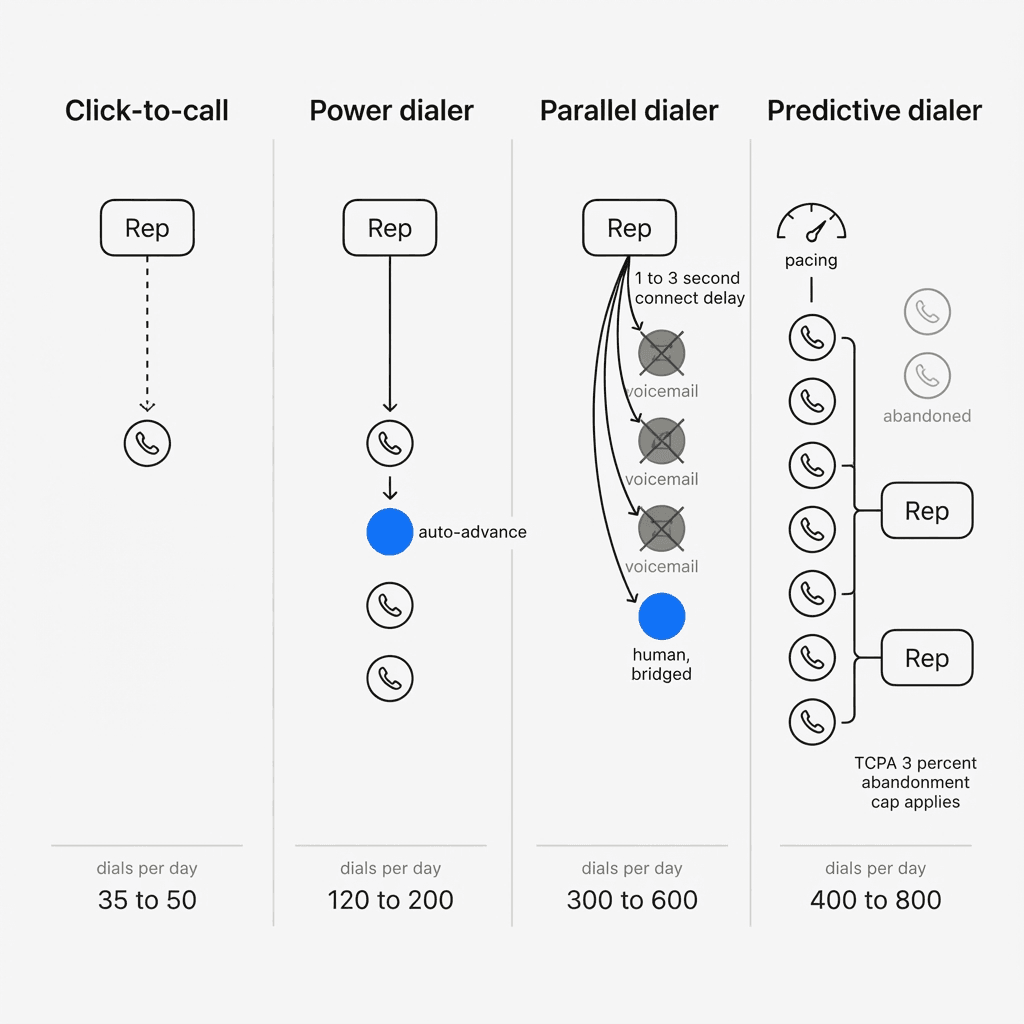
Five products get sold under overlapping words, and the differences between them decide your dial volume, your legal exposure and whether your phone number still works in three months.
Start with the part nobody writing these comparisons will tell you: the category does not agree on what two of these words mean. That claim is checkable, and this page checks it below.
The five things being sold, mechanically
Click-to-call. A link in a CRM record. Clicking it places one call. The rep still chooses who to call, waits through the ring, and types the note afterwards. Several vendors put this on an entry tier and use the word dialer in the marketing around it. Aircall Essentials, JustCall Team, Close Essentials and Kixie's entry plan are all click-to-call.
Power dialer. The rep loads a list and starts a session. The system dials the first number. When the call ends the rep taps a disposition and the next number dials immediately with no gap. One call at a time per rep, and the rep hears every ring. This is the workhorse of B2B outbound and 20 of the 21 tools reviewed on this site offer one.
Progressive dialer. The same loop with a fixed preview window on the record before the call places, and pacing tied to agent availability rather than to the rep tapping next. Whether that is a different product is the argument this page settles below.
Parallel dialer. The system opens three to ten lines per rep at once. Software listens to each line and classifies what picks up as a human, a voicemail greeting or an automated system. It drops everything that is not human and bridges the rep to the one that is. If two humans answer at once, one gets dropped.
Predictive dialer. The system dials more numbers than there are free agents, using a pacing algorithm that predicts when agents will become available from historical call durations and answer rates. Built for a supervised queue rather than for individual reps working their own lists.
Power dialer vs progressive dialer, and why nobody can answer it
This is the most searched pairing on this page and it has no clean answer, because the vendors contradict each other and at least one contradicts itself.
RingCentral says they are the same thing. Its own power dialer page states, in its own words, that "A power dialer, also referred to as a progressive dialer, is a piece of telephony technology that automates the dialing of leads in a list."
RingCentral's own product documentation does not contain a power dialer. The RingCX dial-modes article, read 2026-09-19, states: "RingCX has multiple dial modes available, each serving specific operational needs: Predictive, Preview, Progressive, HCI (Human Call Initiator), and Manual." Five modes. No power dialer among them.
Four other vendors sell pages on the difference. MightyCall, JustCall, CloudTalk and Ringover each publish a power-versus-progressive comparison, and they broadly agree that progressive waits for the agent to signal ready while power dials straight through. Ringy reverses it, describing the progressive dialer as the one with screening and the power dialer as connecting agents to every call without any. One of these pages carries an ROI claim, that progressive dialers break even within 90 days where power dialers take four to six months, with no study named and no sample size.
Now the arithmetic, from this site's own dataset. Of the 21 dialers reviewed here, 4 name a progressive mode: Dialpad Sell, Kixie, Readymode, RingCentral. Not one of them prices it separately from its power or predictive dialing. There is no progressive tier, no progressive add-on and no progressive line item anywhere in the roster. Two of the four vendors publishing comparison pages on the distinction, JustCall and CloudTalk, do not list a progressive mode in their own product at all.
So the useful reading is that progressive describes a setting on a dialer you are already buying. If a salesperson quotes you a higher tier because you said the word progressive, ask them to show you the line item.
Throughput, and the number the vendors quote per hour
| Type | Dials per rep per day | Conversations a day at 4.8% | Lines open per rep |
|---|---|---|---|
| Manual from a spreadsheet | 35 to 50 | 2 to 3 | 1 |
| Click-to-call in a CRM | 50 to 80 | 2 to 4 | 1 |
| Power dialer | 120 to 200 | 6 to 10 | 1 |
| Progressive dialer | 120 to 200 | 6 to 10 | 1 |
| Parallel dialer | 300 to 600 | 14 to 29 before drops | 3 to 10 |
| Predictive dialer | 400 to 800 | Agent talk-time driven | More than agents |
The single largest jump on that table is manual to power dialer. Roughly forty dials a day becomes roughly a hundred and fifty, which is close to a fourfold increase in conversations. It costs $44 a month all in at the cheapest published option, and it carries no new legal exposure and almost no number reputation risk.
Those are per-day figures, and vendors quote per-hour figures. Klenty's parallel dialer page, read 2026-09-19, advertises "Make 340+ Calls Per Hour" in its hero and "Execute 150-350 dials per hour" in its capabilities block, for a dialer it defines as running two to ten lines. Against this site's 300 to 600 dials per rep per day, that looks like a contradiction by a factor of eight. Both numbers can be true at once. The gap between them is the ratio of actual dialing hours to the working day, which no vendor states.
Two things fall out of the vendor's own pair of numbers, and both matter more than the headline.
The conversations rate. Klenty's page claims 340+ dials and 10+ conversations in the same hour. That is a conversation for about every 34 dials, or 2.9 percent, against the 4.8% average connect rate Cognism reports for B2B cold calling. Parallel dialing buys conversations per hour. It costs you conversations per dial, because classification drops ambiguous answers and because volume pushes you deeper into the weak end of the list.
The list runs out. At 340 dials an hour a single rep burns a 2,000-record list in 5.9 hours of dialing. Not 5.9 days. Hours. For most teams the binding constraint on a parallel dialer is data, and the tool that triples your dial rate also triples your data bill. No page on this SERP prices that.
Predictive dialer vs progressive dialer
The difference here is real, unlike the last one, and it is a single mechanical fact: a progressive dialer never dials a number without a free agent for it, and a predictive dialer does. Everything else follows from that.
A progressive dialer abandons no calls, which means no FCC abandonment exposure and no silent calls going out under your number. Its ceiling is one conversation per agent at a time.
A predictive dialer over-dials deliberately, so a share of answered calls reach nobody. The FCC caps abandoned calls at three percent, measured over a 30-day period per campaign. That cap is why predictive dialing belongs to staffed contact centres: the algorithm needs enough agents to predict against, and somebody has to be accountable for the number every month.
5 of the 21 tools here offer predictive dialing: Close CRM, CloudTalk, JustCall, Readymode, RingCentral. Pricing it needs care, because the cheapest tier at a vendor is rarely the tier that dials predictively. Close CRM is the clearest published example: its power dialer arrives on Growth at $99 a seat and predictive only on Scale at $139, a $40 step for the pacing algorithm alone. RingCentral's RingCX is the cheapest seat that dials predictively out of the box at $65 an agent, and it is a contact centre licence rather than a sales seat.
Power dialer vs parallel dialer, and the two costs
The connect delay. Classification takes time. Between the prospect saying hello and the rep being bridged, there is a pause of roughly one to three seconds. Every vendor works on shortening it and none has removed it. A prospect who says hello into silence reads it as a robocall.
Abandoned calls. When two people answer at once, one is dropped. That person gets a silent call from your number. Do that a few hundred times a day and carrier analytics engines treat your number the way they treat a robocaller's.
Carrier analytics from Hiya for AT&T, TNS for Verizon and First Orion for T-Mobile score numbers independently on call volume, duration, answer rate and abandonment. Short calls, unanswered calls and abandoned calls all read as robocall behaviour, and the working threshold is around ~100 to 150 dials/number/day. Parallel dialing generates all three by design, which is why serious vendors in that category sell number rotation across large DID pools and managed caller ID reputation.
Clearing a spam label with one engine does not clear it with the others. STIR/SHAKEN attestation will not prevent a Spam Likely label either: it proves a carrier knows you and that you have the right to use the number, and says nothing about how you use it.
What each mode actually costs
| Mode | Tools here that name it | Does it carry a price of its own? |
|---|---|---|
| Power | 20 of 21 | Yes, as a tier boundary at 9 of 21 vendors. Largest gap: REDX, $199 to $299. |
| Parallel | 11 of 21 | Yes. CloudTalk sells it as a $39 per-user add-on on top of any seat. |
| Progressive | 4 of 21 | No. Not a tier, not an add-on, not a line item anywhere in the roster. |
| Predictive | 5 of 21 | Yes, as a tier. Cheapest tier that names it: Close CRM Scale, $139. |
Read the third column. Progressive is the only one of the four that carries no price anywhere in this roster. There is no progressive tier, no progressive add-on and no progressive line item at any of the 21 vendors, including the 4 that name the mode. That is the strongest evidence available for treating it as a feature flag.
Two warnings about how these numbers get quoted back to you, both of which this site has watched happen.
The first is the tier boundary. At 9 of the 21 vendors here the cheapest plan does not include a dialer, and the gap is the product: REDX goes $199 to $299, Close CRM goes $9 to $99, Dialpad Sell goes $39 to $95. A quote for the entry tier is a quote for something that will not dial.
The second is the add-on. CloudTalk's parallel dialer costs $39 per user per month on top of a seat, so the cheapest CloudTalk configuration that dials in parallel is $49 plus $39, or $88 a user a month. Asked for the cheapest parallel dialer in September 2026, an AI assistant answered "CloudTalk offers parallel dialing at $39/user/month", reading the add-on as if it were the whole price. The real floor is 2.3 times that. Check the line items.
The telephony half is small and everyone leaves it out. One rep at 150 dials a day runs 1,166 billable minutes and costs $17 a month on your own Twilio account, at the published US rate of $0.014 a minute and $1.15 a month per number, read 2026-09-04. The same rep at 450 dials a day on a parallel dialer runs 3,497 minutes and costs $50. Tripling your dial volume adds $33 of telephony. The expensive part of parallel dialing has never been the minutes.
The regulatory line
Facebook v. Duguid, 2021. The Supreme Court held unanimously that an automatic telephone dialing system under the federal TCPA must use a random or sequential number generator to store or produce numbers. Dialing from an uploaded list does not meet that definition. This is why list-based power and parallel dialers exist as a mainstream product category at all.
The three percent abandonment cap. Predictive dialers remain subject to the FCC's rule limiting abandoned calls to three percent, measured over a 30-day period per campaign.
State mini-TCPA statutes. Florida and Oklahoma, among others, define autodialers more broadly than the federal standard. Calling into those states carries different exposure than the federal analysis suggests.
Damages. $500 per call, trebled to $1,500 for willful or knowing violations, with no cap. Roughly 80 percent of TCPA suits are class actions.
This is orientation, not legal advice. Anyone dialing consumers at volume should have counsel.
Which one you should use
Use a power dialer if you are doing B2B outbound, your reps have consultative conversations, or you are a small team. This covers the large majority of sales teams and it is the recommendation this site makes most often. The floor is $44 a month all in for one rep on Myphoner.
Turn on progressive pacing if your reps need a few seconds on the record before the call places. Do not pay extra for it. Nothing in this roster charges extra for it.
Use a parallel dialer if your reps are already at 150-plus dials a day on a clean list, your connect rate is above about 4 percent, your list is deep enough to survive 5.9 hours of dialing per two thousand records, and you have enough phone numbers to rotate properly. Test it on your own data before committing, because parallel dialing suits some lists and destroys others.
Use a predictive dialer if you are running an actual call centre with supervisors, a queue and a named person accountable for the abandonment rate. If that description does not match your team, this is the wrong category.
Never accept click-to-call as your dialer. Where a vendor's entry tier is click-to-call and the next tier up is a real power dialer, the gap between those two prices is the product.
Where the recommendation on this site loses, on this page specifically
This site most often recommends DialSheet, and on this page that recommendation is narrower than on any other, so the limits go here rather than in a footnote. DialSheet does power dialing and parallel dialing on two to four lines, and nothing else. It has no progressive mode and no predictive mode at all, so two of the four things this page compares are not available in it on any plan.
Three specific cases, each with the number that decides it.
Ten-line parallel dialing. DialSheet runs two to four lines. A team that needs ten wants Orum, whose 9-seat minimum makes it a different scale of purchase and which publishes no price at all.
A supervised queue that needs predictive pacing. DialSheet cannot do it. Close CRM Scale at $139 a seat can, and Readymode at $199 a licence is built for nothing else.
Every mode in one platform, preview through predictive. RingCentral's RingCX at $65 an agent is 2.2 times DialSheet's seat price and buys a different category of product: five documented dial modes, ACD, IVR and skills-based routing. If you are staffing a queue, pay it.
What DialSheet does have on this page is the thing the table above makes visible. Its power dialer is included on a free plan and on a $29 seat, where 9 of the 21 vendors here put a dialer behind a paid upgrade, and its minutes run on your own carrier at $0.014 rather than inside the seat. That is an argument about power dialing. It is not an argument about the other three modes, and this page does not make one.
The question to ask a vendor
Not "do you have a power dialer". Ask two things.
How many milliseconds between one call ending and the next dialing, and how many numbers do I get to rotate across? The first answer determines your dial volume. The second determines whether you still have working numbers in three months.
Then ask them to open their own documentation and read you the list of dial modes. If the mode they sold you is not in it, you have learned something about the vendor rather than about dialers.
Frequently asked questions
- What is the difference between a power dialer and a predictive dialer?
- A power dialer places one call at a time for each rep and the rep is on the line before it rings, so no call is ever abandoned. A predictive dialer places more calls than there are free agents, using a pacing algorithm to guess when agents will finish, so some answered calls reach nobody. That difference is what puts predictive dialing under the FCC's three percent abandonment cap and leaves power dialing outside it. Power dialing suits a rep working their own list; predictive suits a supervised queue.
- What is the difference between a progressive dialer and a power dialer?
- Depends entirely on who is selling it, and that is the real answer. RingCentral's own power dialer page defines a power dialer as "also referred to as a progressive dialer". 4 of the 21 tools reviewed here name a progressive mode, Dialpad Sell, Kixie, Readymode, RingCentral, and none of them charges a different price for it than for their power dialer. Where a vendor does draw a line, progressive adds a fixed preview window on the record before the call places. Treat it as a setting on the dialer you already chose.
- Which is better, a predictive dialer or a progressive dialer?
- Progressive for almost everyone outside a staffed contact centre, because it abandons no calls. A predictive dialer earns its abandonment exposure only when you have enough agents for the pacing algorithm to have something to predict, which in practice means a supervised queue rather than a few reps working their own lists. The FCC's three percent abandonment cap is measured over 30 days per campaign, so somebody has to own that number. If nobody on your team owns it, you want progressive.
- What is the difference between a power dialer and a parallel dialer?
- A power dialer places one call per rep at a time, so the rep hears every ring and every connect is a clean conversation with no delay. A parallel dialer rings three to ten numbers at once per rep, classifies what answers, and bridges the rep only to live humans, dropping the rest. Parallel dialing multiplies dials by roughly three, at the cost of a one to three second connect pause, materially higher spam-flag risk on your numbers, and a list that empties three times faster.
- Is a power dialer the same as an auto dialer?
- No, though the terms are used interchangeably. Auto dialer is an umbrella term covering any system that dials automatically, including power, progressive, parallel and predictive dialers. A power dialer specifically means one call at a time per rep, initiated automatically from a list, with the rep present for the whole call. When a vendor says auto dialer without qualifying it, ask which of the four they mean and ask them to name the dial mode in their own documentation.
- Are power dialers legal under the TCPA?
- Power dialers and list-based parallel dialers are generally not automatic telephone dialing systems under the federal TCPA following Facebook v. Duguid in 2021, which held unanimously that the equipment must use a random or sequential number generator to store or produce numbers. Dialing from an uploaded list does not meet that definition. State mini-TCPA statutes in Florida and Oklahoma define autodialers more broadly, and predictive dialers remain subject to the three percent abandonment cap. This is orientation, not legal advice.
- Which dialer type should a B2B sales team use?
- A power dialer, in almost every case. B2B outbound is a consultative conversation where the connect delay of a parallel dialer costs more than the extra dials are worth, and predictive dialing carries abandonment exposure with no upside for a team that is not running a supervised queue. Parallel dialing becomes worth considering only once reps are already dialing 150-plus numbers a day on a clean list with a connect rate above about 4 percent and a list deep enough to survive the extra volume.
How to cite this page
Abhi Chawla. "Power dialer vs parallel, progressive and predictive dialers." MRR Nerds, 2026-09-19. https://www.mrrnerds.com/guides/power-dialer-vs-parallel-dialer-vs-predictive-dialer. Accessed 2026-10-16.
The underlying vendor data is published at /data under CC BY 4.0. Cite the dataset for numbers, this page for the analysis.