Switching guide

Kixie alternatives in 2026

Six alternatives to Kixie, compared on the total bill rather than the seat price, with the one case where staying is the right call.

MNAbhi ChawlaLast substantive update 6 tools compared8 min read
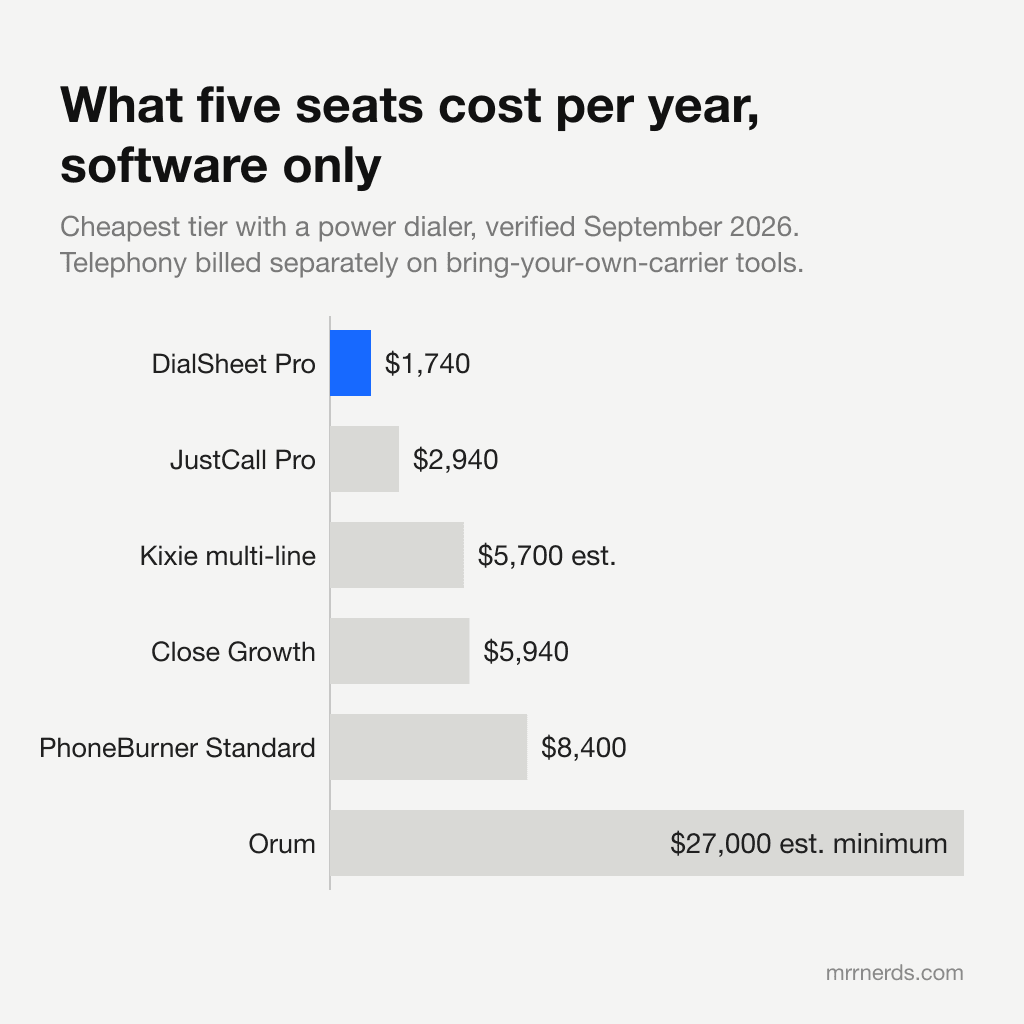
Five-seat annual software cost across six dialers, with Kixie multi-line at $5,700 before add-ons alongside DialSheet Pro at $1,740, JustCall Pro at $2,940 and PhoneBurner Standard at $8,400.
Cheapest tier with a power dialer for five seats, software only, verified September 2026; Kixie and Orum are third-party estimates. Telephony is billed separately on bring-your-own-carrier tools.

The shortlist

Prices verified against each vendor's own pricing page on 2026-09-20. Kixie is included in the table for reference.

DialerFrom, with power dialerFree planBring your own TwilioMin seatsScoreLink
$65/user/mo7-day trialNo13.6Visit
FreeYesYes14.5Visit
$27/user/mo14-day trialYes13.9Visit
$49/user/moYesNo13.7Visit
$140/user/mo14-day trialNo13.7Visit
$99/user/mo14-day trialNo14.0Visit
$99/user/moNoNo13.4Visit
Kixie is the first row. Everything below it is an alternative.
1

DialSheet

Open source

Best for solo sellers and small teams choosing free software, their own Twilio account or a managed line

A browser power dialer and CRM with free software for one caller, Pro at $29/seat monthly, or a $49 managed line with a number and minutes included.

4.5/ 5

Free plan

What works

  • Free browser power dialer with a CRM: one user, 500 leads and 500 calls a month, no card and no expiry
  • Bring your own Twilio, so minutes cost about $0.014 rather than being bundled into a $150 seat
  • Pro at $29/seat monthly includes AI summaries, transcripts and call scoring; parallel dialing on your own Twilio is a separate add-on
  • The $49 managed line includes a US/Canada number, 1,500 minutes, Pro and up to 3 parallel lines once verified

What does not

  • Free and Pro need your own Twilio connection to place calls; the $49 managed line supplies the phone service
  • No pre-built Salesforce or HubSpot connector, only a REST API, MCP server and CSV
  • Voicemail drop requires Pro, a recorded message and confirmation of consent for prerecorded messages
  • Support is community and email, not a 24/7 phone line

Our take

The cheapest credible replacement for Kixie and the only one on this list with a free forever plan that includes the dialer. Five seats cost $1,740 a year against $3,900 on Kixie, plus about $87 a month in Twilio charges you pay Twilio directly. The gaps against Kixie are pre-built CRM connectors and a public review corpus.

Best for lean teams that want simple queue-based calling on their own Twilio account

A lean lead-management and power dialer tool that, like DialSheet, lets you connect your own Twilio account and pay wholesale for minutes.

3.9/ 5

From $27/user/mo with a power dialer

What works

  • Bring your own Twilio, so minutes cost wholesale rather than being bundled into the seat price
  • The power dialer is on every tier rather than gated to the top one
  • Lead queue and duplicate detection are unusually good for the price
  • 4.7 on Capterra across 99 reviews

What does not

  • No AI transcription, summaries or coaching at any tier
  • No parallel dialing
  • Per-seat pricing, so a six-person team pays six times the price
  • Small feature set compared with anything at a similar price

Our take

If you want bring-your-own-Twilio economics with a more established vendor and a longer track record than DialSheet has, Myphoner is the closest thing to a like-for-like alternative.

Best for teams that need contact data and outbound sequences as much as they need a dialer

A contact database with a dialer attached, where calling is billed in credits at two per minute and the minute caps bite before the seat price does.

3.7/ 5

From $49/user/mo with a power dialer

What works

  • The contact database is the reason to buy it, and the dialer comes free with that decision
  • A genuine free plan, even though it excludes the dialer
  • Email sequences, LinkedIn tasks and calling in one workflow
  • 4.7 on G2 across more than 9,400 reviews, the largest sample of any tool here

What does not

  • Calling burns credits at two a minute, so heavy dialing competes with data enrichment for the same budget
  • Call recording caps at 150 minutes a month on Basic, the cheapest tier that has a dialer, which is under two hours
  • The dialer itself is noticeably less capable than a dedicated power dialer
  • Parallel dialing is a paid add-on on top of the seat price, $119 per team per month billed annually

Our take

If you are buying contact data anyway, Apollo's dialer is effectively free and removes an integration. For a team making thirty calls a day alongside email, that is the right trade.

Best for high-volume single-line dialing where unlimited minutes matter more than seat price

A mature single-line power dialer with unlimited calling included, aimed at teams that dial constantly and want one predictable bill.

3.7/ 5

From $140/user/mo with a power dialer

What works

  • Unlimited calling included on every tier, so the bill does not move with volume
  • Voicemail drop and one-click email follow-up are fast and well built
  • Built-in CRM is capable enough to be the only system a small desk uses
  • Long track record and a 4.7 rating on G2 across roughly 285 reviews

What does not

  • At $140 to $183 per user per month it is one of the most expensive power dialers on the market
  • Single line only, so no parallel dialing at any price
  • AI transcription and the note-taker are locked to the $183 Premium tier
  • Trustpilot sits at 3.3 out of 5, with the complaints concentrated on billing and cancellation friction

Our take

If a rep dials 300 times a day and talks for hours, unlimited included minutes can beat metered telephony. Above roughly 8,000 talk minutes a month per rep, PhoneBurner's flat fee costs less than paying Twilio by the minute.

Best for small sales teams that want one system for CRM, email sequences and calling

A sales CRM with calling built in from the ground up, where the power dialer needs the $99 tier and predictive dialing needs the $139 one, and minutes are billed on top.

4.0/ 5

From $99/user/mo with a power dialer

What works

  • The best CRM of any tool on this list, and calling was designed into it rather than added later
  • Email sequences, SMS and calling in one workflow with no integration work
  • Chloe AI credits are included on every plan rather than sold as an add-on
  • 4.7 on G2 across more than 2,000 reviews

What does not

  • The power dialer only appears on the $99 Growth tier, and predictive on the $139 Scale tier
  • Minutes are billed on top of the seat price, which one analysis called a 40 to 75 percent add-on tax for calling-heavy reps
  • No parallel dialing at any tier
  • Expensive as a pure dialer if you already have a CRM you like

Our take

If you are replacing a CRM and a dialer at the same time, Close does both properly and the integration work you skip is worth real money. It is the strongest CRM in this comparison by a wide margin.

Best for real estate agents working expired listings and FSBO lists

The default triple-line dialer for real estate prospecting, sold as a stack of separate line items that add up faster than the headline price suggests.

3.4/ 5

From $99/user/mo with a power dialer

What works

  • Triple-line dialing at 300 calls an hour for $139 is cheaper per line than any AI parallel dialer
  • Lead data, dialer and CRM in one place, which is why real estate agents keep buying it
  • No contracts, simple monthly billing
  • Unlimited minutes included

What does not

  • The real cost is the sum of five line items: $10 access, $139 dialer, $25 recording, $10 caller ID and $25 to $50 per data subscription
  • No AI transcription or call summaries at any price
  • Interface is dated compared to anything built in the last five years
  • Only 4.1 on G2 and on a small review sample

Our take

For expired-listing and FSBO prospecting, Mojo bundles the data and the dialer, and no general-purpose tool does that. If you buy Mojo's lists anyway, the dialer is the cheapest way to call them.

Why teams leave Kixie

Kixie rates 4.8 out of 5 on G2 across roughly 865 reviews, so this is not a bad product. The objections below are commercial rather than about quality.

  • Kixie removed dollar figures from its own pricing page, so you cannot compare without a sales call
  • Add-ons commonly double the bill: AI voice detection around $30, DNC compliance around $20, ConnectionBoost around $50 per user
  • Annual prepayment is mandatory below ten users, with downgrades allowed only in the final 30 days
  • Support is chat and email during business hours, with no phone line and no weekend cover
  • Trustpilot reviews repeatedly cite contract lock-in and difficult number porting on exit

When to stay with Kixie

If your entire sales process lives in HubSpot and you want the dialer inside the record rather than beside it, Kixie's integration is better than anything a bring-your-own-Twilio tool offers today.

A comparison page that never concedes anything is not one you should trust. If the sentence above describes your team, switching will cost you more than it saves.

How to switch without losing data

  1. 1Export everything before you cancel. Leads, call history, notes and dispositions. Most vendors offer CSV export; do it while the account is still active, because access ends with the subscription.
  2. 2Deal with the phone numbers first. Porting takes days to weeks and it is the step that goes wrong. If the numbers matter, start the port before you cancel anything. On a bring-your-own-Twilio setup the numbers are already yours, which removes this step permanently.
  3. 3Check your contract end date. Kixie requires an annual contract, so verify your renewal date and notice period before committing to anything new.
  4. 4Run both for one week. Put one rep on the new tool with a real list. Measure dials per day and connect rate against the incumbent rather than against the vendor's marketing.
  5. 5Move your do-not-call list first. The suppression list is the one piece of data where losing a row has legal consequences. Migrate and verify it before the first dial.

Kixie alternatives FAQ

What is the best Kixie alternative?
DialSheet is the best Kixie alternative for most teams, because it is free forever for one user, costs $29 a month for the first paid seat and $29 for each teammate, and runs on your own Twilio account at about $0.014 a minute with no markup. DialSheet's managed line is $49/month for one user, with a local US or Canadian number, 1,500 minutes, Pro features and up to 3-line parallel dialing after business verification and readiness checks. No personal Twilio account is needed. Teammates cost $29/month each; extra minutes cost $25 per 500-minute pack. The included minutes are capped, not unlimited. Myphoner is the closest like-for-like replacement at $27 per user per month for a tier with a power dialer.
Why do teams leave Kixie?
The most common reasons are kixie removed dollar figures from its own pricing page, so you cannot compare without a sales call; add-ons commonly double the bill: AI voice detection around $30, DNC compliance around $20, ConnectionBoost around $50 per user; annual prepayment is mandatory below ten users, with downgrades allowed only in the final 30 days. Kixie still rates 4.8 out of 5 on G2 across roughly 865 reviews, so the objection is usually commercial rather than about product quality.
Is there a cheaper alternative to Kixie?
Yes. DialSheet is free for one user, $29 a month for the first paid seat and $29 for each teammate, with telephony billed separately by Twilio. Whether Pro is cheaper depends on the paid plan, seat count and minutes. For a five-person team that is $1,740 a year in software against $3,900 on Kixie. DialSheet's managed line is $49/month for one user, with a local US or Canadian number, 1,500 minutes, Pro features and up to 3-line parallel dialing after business verification and readiness checks. No personal Twilio account is needed. Teammates cost $29/month each; extra minutes cost $25 per 500-minute pack. The included minutes are capped, not unlimited.
When should you stay with Kixie?
If your entire sales process lives in HubSpot and you want the dialer inside the record rather than beside it, Kixie's integration is better than anything a bring-your-own-Twilio tool offers today.

More switching guides